Executive Summary
- A Google core update should not trigger a rushed content rewrite. For B2B websites, the first priority is to identify which page types changed: service pages, solution pages, product pages, comparison pages, documentation, or informational blog content.
- The most important audit question is not simply “Did organic traffic decline?” but “Did qualified organic visibility decline for pages that influence pipeline?”
- Technical SEO issues often become more visible after major ranking recalibration: weak internal linking, crawl inefficiency, indexation gaps, canonical conflicts, duplicate templates, JavaScript rendering issues, and orphan commercial pages.
- B2B content audits should focus on architecture, consolidation, and buyer journey support rather than publishing more generic blog posts.
- A strong post-core-update audit separates technical access problems from content relevance problems, then prioritizes fixes based on commercial impact.
What Changed
The latest confirmed Google core update, the May 2026 core update, began on May 21, 2026 and was completed on June 2, 2026, according to Google’s Search Status Dashboard. Google’s own core update documentation recommends waiting at least a full week after a rollout completes before performing deeper Search Console comparisons, then reviewing top pages and queries rather than reacting to short-term volatility.
For B2B websites, the practical takeaway is not the name of the update. The important point is that Google’s ranking systems have re-evaluated how pages, sections, and sites deserve visibility across different search intents.
That matters because B2B organic performance is rarely a single-page issue. A core update may appear as a blog traffic decline, but the actual business risk may sit elsewhere:
- Service pages losing impressions for high-intent queries
- Product or solution pages slipping below competitors
- Technical documentation receiving less visibility
- Comparison pages no longer ranking for evaluation-stage searches
- Commercial landing pages remaining indexed but receiving weaker internal support
- Informational content attracting traffic that does not convert into qualified pipeline
There is also a newer AI search layer. Google’s guidance on generative AI features explains that AI Overviews and AI Mode are still rooted in Google’s core Search systems, and that crawlable, indexable, publicly accessible content remains foundational. In other words, AI visibility does not replace technical SEO. It increases the cost of having unclear architecture, weak page quality, poor internal linking, or indexation problems.
For B2B teams, this means a post-core-update review should not be framed as “How do we recover all traffic?” A better question is:
Are the pages that influence pipeline still discoverable, indexable, well-linked, differentiated, and aligned with how buyers search?
Why This Matters for B2B Websites
B2B SEO behaves differently from consumer SEO because traffic value is unevenly distributed. A blog article with 10,000 monthly visits may contribute little if the audience is too broad, too early-stage, or not commercially relevant. A service page with 300 qualified visits may be more valuable if those visitors include enterprise buyers, procurement teams, technical evaluators, founders, or decision-makers comparing vendors.
B2B sales cycles are longer
In many B2B websites, organic search supports a long buying process. A potential customer may first arrive through a problem-focused article, return later through a comparison query, review a solution page, read technical documentation, check pricing-related content, and only then request a demo or consultation.
After a core update, looking only at last-click conversions can be misleading. A page that does not directly convert may still support assisted conversions, sales enablement, or buyer education. The audit should therefore examine organic visibility across the journey, not only final conversion pages.
A useful B2B post-update segmentation may include:
- Problem-aware informational pages
- Solution-aware content
- Product or service pages
- Industry or vertical pages
- Comparison and alternative pages
- Technical documentation
- Case study or proof pages
- Contact, demo, quote, or consultation paths
If a core update weakens the middle or bottom of this journey, the pipeline impact may appear weeks or months later.
Commercial pages often matter more than blog traffic
Many B2B teams overreact when blog sessions decline and underreact when commercial pages lose visibility. This is a common reporting problem.
A high-volume blog decline may look dramatic in analytics, but it may involve low-intent traffic. A smaller decline on service pages, solution pages, product category pages, or comparison pages may be more serious because those pages are closer to revenue.
A post-core-update audit should therefore answer:
- Did commercial landing pages lose impressions?
- Did bottom-of-funnel queries decline?
- Did competitors gain visibility for service-related terms?
- Did rankings shift for product, solution, or vendor comparison queries?
- Did organic demo, consultation, quote, or inquiry paths change?
- Did qualified leads change, or only raw traffic?
For B2B SEO, not all organic traffic deserves equal attention.
Indexation problems can hide revenue pages
Indexation problems are especially damaging in B2B because many sites have a small number of pages that carry disproportionate commercial value.
A SaaS company may rely on a handful of product, integration, and use-case pages. A manufacturing company may depend on product category pages, specification pages, application pages, and distributor-related content. A professional services firm may depend on service pages, industry pages, and thought leadership content that supports credibility.
If these pages are not indexed, canonicalized correctly, internally linked, or included in crawlable architecture, organic demand can weaken without an obvious sitewide warning.
Common B2B indexation issues include:
- Important pages marked
noindex after a redesign - Service pages excluded from XML sitemaps
- Canonicals pointing to outdated or generic pages
- Product variants creating duplicate indexable URLs
- Parameter URLs competing with clean URLs
- Campaign landing pages orphaned from the main architecture
- JavaScript-rendered content not appearing consistently in crawls
- Thin industry pages being discovered but not indexed
The issue is not always that Google cannot find the website. Often, Google can find the website but does not receive clear enough signals about which pages matter most.
Search visibility should connect to qualified traffic, not vanity traffic
A core update can reduce unqualified traffic while leaving the business relatively healthy. It can also leave total traffic stable while weakening commercial visibility.
This is why B2B teams should avoid judging post-update performance by total clicks alone. A better review should connect organic search to:
- Query intent
- Landing page type
- Engagement quality
- Conversion path
- Lead qualification
- Sales feedback
- Pipeline contribution
- Assisted conversion role
The goal is not to recover every lost visit. The goal is to protect and improve visibility that attracts the right companies, roles, and buying situations.
Technical SEO and content architecture determine whether important pages can rank
Technical SEO is not only a backend task. Content architecture is not only a content team task. Together, they determine how search engines discover priority pages, understand topical relationships, and evaluate whether a site deserves visibility for commercial searches.
In many B2B websites, the blog grows separately from the service architecture. The result is a site with many informational articles but weak pathways into commercial pages. After a core update, this separation can become more visible.
A strong B2B website should make it easy to understand:
- What the company does
- Who it serves
- Which problems it solves
- Which industries or use cases it supports
- Which pages are primary commercial destinations
- Which resources support those commercial pages
- How informational content leads buyers toward evaluation
If that structure is unclear to users, it is often unclear to search engines as well.
Technical SEO Implications
A post-core-update technical audit should not be a generic crawl report. It should investigate whether technical signals are helping or weakening revenue-critical visibility.
Crawlability
Start by confirming whether Google can reach the pages that matter. This includes robots.txt rules, internal links, navigation, XML sitemaps, pagination, faceted navigation, and JavaScript-dependent links.
For B2B websites, crawlability issues often appear in less obvious areas:
- Product filters
- Resource libraries
- Technical documentation
- Regional or industry landing pages
- Partner pages
- Gated and ungated content paths
- CMS-generated tag or archive pages
- Old campaign URLs
- Parameter-heavy product pages
The key question is not simply “Can Google crawl the site?” but:
Can Google efficiently crawl the pages that support qualified demand?
If Googlebot spends too much time on low-value parameters, duplicate archives, internal search pages, or outdated campaign URLs, important commercial pages may receive weaker crawl attention.
Indexation
Indexation should be reviewed by page type, not only by total indexed URL count.
A website can have thousands of indexed URLs and still fail if its most important service or product pages are excluded, canonicalized away, duplicated, or internally isolated.
Review:
- Indexed commercial pages
- Excluded commercial pages
- Discovered but not indexed URLs
- Crawled but not indexed URLs
- Canonicalized pages
- Pages blocked by robots.txt
- Pages marked
noindex - Sitemap-submitted URLs versus indexed URLs
- Indexation differences by template
For B2B sites, it is useful to create an indexation priority list. This list should include the URLs that matter most commercially, such as service pages, product pages, solution pages, comparison pages, industry pages, integration pages, and conversion-supporting resources.
Google’s Search Essentials note that following core requirements makes pages eligible to appear in Search, but there is no guarantee that any specific page will be indexed. For B2B teams, this makes indexation control especially important for pages with direct commercial value.
Internal linking
Internal linking should clarify importance and context. A common issue in B2B websites is that blog posts link heavily to other blog posts, while service and solution pages receive few contextual links.
This creates a structural problem: informational content receives visibility but does not transfer enough relevance or authority to commercial pages.
A post-update internal linking audit should check:
- Which pages receive the most internal links
- Whether commercial pages receive links from relevant articles
- Whether anchors describe the destination clearly
- Whether topic hubs link to supporting and commercial pages
- Whether breadcrumbs reinforce hierarchy
- Whether old high-authority pages link to current priority pages
- Whether important pages are buried too deep
- Whether internal links are placed for user logic, not just SEO
Random internal linking is not architecture. A better approach is to build intentional pathways from problem-aware content to solution-aware and commercial pages.
Site architecture
A strong B2B site usually has clear relationships between services, products, industries, use cases, resources, proof, and conversion paths.
A weak B2B architecture often looks like this:
- A homepage
- A few broad service pages
- A large blog archive
- Disconnected resources
- Isolated landing pages
- Minimal topical hierarchy
This structure may generate traffic, but it often struggles to support commercial rankings.
A post-core-update audit should review whether the website has:
- Clear service or product hubs
- Supporting topic clusters
- Logical URL structure
- Helpful breadcrumbs
- Crawlable navigation
- Relevant internal links between related pages
- Strong commercial destinations
- Clear differentiation between similar pages
Architecture should help both users and search engines understand what the company should be trusted for.
Canonical signals
Canonical conflicts can weaken visibility when multiple URLs represent similar content.
Google explains canonicalization as the process of selecting a representative URL from duplicate or very similar pages. Google also provides multiple ways to indicate a preferred canonical URL, including redirects, rel="canonical", and sitemap signals.
In B2B websites, canonical issues often appear across:
- Product variants
- Industry pages
- Location pages
- Campaign landing pages
- Parameter URLs
- Resource filters
- Blog tags
- Duplicate PDFs and HTML versions
- International or regional versions
The audit should check whether canonical tags, internal links, XML sitemaps, redirects, and hreflang references all support the same preferred URL.
If internal links point to one URL, the sitemap lists another, and the canonical points somewhere else, Google receives mixed signals.
Duplicate or thin pages
Thin and duplicate pages are common in B2B because marketing teams often create many near-identical pages for industries, locations, products, use cases, or services.
Examples include:
- “SEO for SaaS companies”
- “SEO for software companies”
- “SEO for technology companies”
- “SEO for B2B software companies”
If the pages target similar intent without meaningful differentiation, they can create internal competition.
The solution is not always to rewrite every page. Depending on the situation, the better action may be:
- Consolidate overlapping pages
- Redirect weaker pages into stronger hubs
- Expand pages only where intent is distinct
- Noindex low-value pages
- Rebuild templates around clearer differentiation
- Create stronger parent-child architecture
A mature content audit should decide what role each page plays.
JavaScript rendering issues
Many SaaS and enterprise technology websites rely heavily on JavaScript for navigation, content modules, product tables, tabs, pricing sections, comparison elements, or interactive demos.
Google can process JavaScript, but JavaScript SEO is still more complex than static HTML. Google’s JavaScript SEO documentation recommends keeping important signals such as canonical URLs consistent and warns against using JavaScript to change canonical URLs to different values from the original HTML.
After a core update, rendering should not be blamed automatically, but it should be tested carefully.
Review:
- Raw HTML versus rendered HTML
- Whether main content appears before and after rendering
- Whether internal links are crawlable
- Whether canonical tags render consistently
- Whether structured data appears in rendered output
- Whether product or service details depend on user interaction
- Whether important navigation is hidden behind scripts
- Whether templates behave differently across devices
If important content exists for users but not in the rendered crawl, the page may be weaker than it looks.
Page quality signals
Page quality should not be reduced to word count. For B2B websites, quality often means whether the page helps a serious buyer evaluate fit.
Commercial pages should answer questions such as:
- What problem does this solve?
- Who is this for?
- When is this service or product a good fit?
- When is it not a good fit?
- What is the process?
- What are the technical or operational considerations?
- What proof supports the claim?
- What should the buyer do next?
A thin service page with vague claims and no clear buyer guidance is unlikely to compete well, even if it is technically indexable.
Structured data
Structured data will not compensate for weak content or poor architecture, but it can help clarify entities and page purpose. Google’s structured data documentation states that Google uses structured data to understand page content and gather information about entities represented on the web.
Depending on the page type, B2B websites may review:
- Organization markup
- Breadcrumb markup
- Article markup
- Product markup
- FAQ markup where appropriate
- SoftwareApplication markup for SaaS products
- Video markup
- Review markup where eligible and compliant
Structured data should match visible content. It should not be used to imply services, reviews, or product details that are not clearly present on the page.
Log file or crawl data review
For larger B2B websites, crawl data and log file data can reveal different things.
A crawler shows how your architecture is structured. Log files show how search engines actually behave.
Together, they can answer:
- Which URLs does Googlebot crawl most often?
- Is crawl activity wasted on low-value pages?
- Are priority pages crawled regularly?
- Are redirects consuming crawl activity?
- Are old URLs still receiving bot attention?
- Are parameter pages creating crawl waste?
- Are important templates under-crawled?
This is especially useful for enterprise sites, large manufacturing catalogs, SaaS documentation libraries, and websites with many filters or regional pages.
Orphan pages and commercial landing page visibility
Orphan pages are common in B2B because marketing teams create landing pages for campaigns, product launches, events, verticals, or sales enablement without integrating them into the main architecture.
An orphan commercial page may be technically live but strategically invisible.
Audit for:
- Pages in analytics but not in the crawl
- Pages in XML sitemaps but not internally linked
- Pages with backlinks but no internal links
- CMS pages not included in navigation or hubs
- Paid landing pages that should or should not be indexed
- Old campaign pages still indexed without current relevance
If a page supports organic acquisition, it should be connected to the site architecture. If it does not, it should have a clear indexation decision.
Content and Internal Linking Implications
The wrong response to a core update is to publish more content before understanding what changed.
For B2B websites, the content audit should start with inventory, classification, and commercial role.
Which content should be retained?
Retain content that still serves a clear buyer, evaluator, technical, or decision-making purpose.
This may include:
- Product documentation
- Implementation guides
- Industry explainers
- Comparison content
- Technical buying guides
- Integration content
- Use-case pages
- Service methodology pages
- Decision-stage educational content
Even if some pages lost traffic, they may still support assisted conversions or internal linking.
Which content should be updated?
Update pages where the topic is still commercially relevant but the content is outdated, too generic, incomplete, or disconnected from current buyer needs.
Common examples include:
- Old “ultimate guides”
- Trend posts with outdated references
- Comparison articles that no longer reflect the market
- Service pages with vague positioning
- Product pages missing technical details
- Industry pages with generic copy
- Blog posts that rank but fail to guide buyers toward next steps
The update should add substance, not just new dates, more words, or rewritten intros.
Which content should be consolidated?
Consolidate pages that compete for the same intent.
A SaaS site may have five articles about the same integration challenge. A manufacturing website may have multiple thin pages about similar applications. A professional services firm may have overlapping pages around the same advisory topic.
Consolidation can help create a stronger canonical resource, preserve useful content, reduce duplication, and improve internal link focus.
Which content should be removed or noindexed?
Remove or noindex content that has no clear search purpose, no commercial support role, no internal linking value, and no user value.
This may include:
- Thin tag pages
- Outdated event posts
- Low-quality AI-generated pages
- Duplicate announcements
- Obsolete campaign pages
- Internal search result pages
- Old resource pages with no relevance
- CMS-generated archives with no strategic value
Content pruning should not be careless. Every removal should have a redirect, consolidation, or noindex decision.
How blog content should support service, solution, and product pages
Blog content should not operate separately from commercial architecture.
A strong B2B blog should help users move from problem recognition to solution evaluation. For example:
- A problem-focused article should link to a relevant service page.
- A technical guide should link to implementation or product pages.
- A comparison article should link to solution and proof pages.
- An industry article should link to vertical-specific services or product applications.
- A glossary page should link to deeper educational and commercial resources.
The goal is not to force internal links into every paragraph. The goal is to create a logical buyer pathway.
How internal links help commercial pages earn authority
Commercial pages often need support from informational content. Internal links help communicate which pages are important and how they relate to the topic.
For example, a technical SEO agency site might have articles about crawl budget, JavaScript SEO, indexation, internal linking, and site architecture. Those articles should not only link to each other. They should also support core service pages such as Technical SEO, SEO Audit, Indexation SEO, and B2B SEO.
This is how informational visibility can support commercial visibility.
Topical authority is built through structure
Topical authority is not only about publishing many articles. It is built through structure, expertise, and relationships between pages.
A strong topical structure includes:
- A clear commercial hub
- Supporting educational content
- Technical depth where appropriate
- Internal links from support pages to commercial pages
- Related resources grouped logically
- Avoidance of unnecessary overlap
- Clear differentiation between page intents
In many B2B websites, fewer but stronger pages outperform large archives of disconnected content.
Informational traffic should convert into qualified pipeline
Not all informational traffic is valuable. Some informational queries attract students, job seekers, vendors, competitors, or people too far from a buying situation.
A B2B content audit should identify which informational pages actually support qualified demand.
Useful questions include:
- Does this page attract the right audience?
- Does it connect to a commercial next step?
- Does it support a known buyer pain point?
- Does it assist conversions later?
- Does sales recognize this topic as relevant?
- Does the content help buyers make a decision?
- Does the page strengthen topical authority around a commercial service?
If the answer is no, the page may not deserve priority even if it drives traffic.
What B2B Teams Should Audit Now
Common Mistakes to Avoid
Chasing news instead of auditing the site
Many teams read every update summary but do not inspect their own site. A core update analysis should be grounded in Search Console, crawl data, indexation data, analytics, CRM quality, and page-type segmentation.
The question is not “What did the SEO industry say happened?” The question is “What happened to our priority pages, our buyers, and our pipeline?”
Publishing more content before fixing indexation
If important pages are not indexed, poorly linked, canonicalized incorrectly, or blocked by rendering issues, publishing more content will not solve the underlying problem.
In some cases, it can make the site harder to evaluate by adding more low-value URLs, duplicate pages, or disconnected blog posts.
Treating all traffic drops the same
A 20% decline in low-intent blog traffic may be less serious than a 5% decline in high-intent product or service visibility.
B2B SEO teams should prioritize commercial impact over raw traffic volume.
Ignoring commercial pages
Commercial pages are often the weakest part of B2B SEO programs because teams invest heavily in blog content and lightly in service architecture.
After a core update, these pages deserve focused review:
- Service pages
- Product pages
- Solution pages
- Industry pages
- Use-case pages
- Comparison pages
- Integration pages
- Demo or consultation paths
If these pages are not competitive, informational content alone will not carry the SEO program.
Over-relying on rankings instead of pipeline quality
Rankings are useful diagnostics, but they are not business outcomes.
A page may rank for a keyword that brings the wrong visitors. Another page may have lower traffic but stronger sales relevance.
Post-update reporting should connect visibility to qualified traffic, buyer intent, and pipeline quality wherever possible.
Using AI content at scale without editorial review
AI-assisted content can be useful, but scaling generic pages without expert review often creates duplication, shallow analysis, and weak differentiation.
For B2B websites, this is especially risky because buyers expect specificity. A procurement leader, IT director, plant manager, founder, or enterprise buyer can usually recognize generic content quickly.
AI-assisted content should be reviewed for:
- Accuracy
- Differentiation
- Commercial relevance
- Buyer usefulness
- Technical depth
- Internal linking logic
- Brand and service alignment
- Original perspective
Adding internal links randomly without architecture
Internal links should reflect structure. Adding dozens of unrelated links to commercial pages does not create topical authority. It creates noise.
A better approach is to define:
- Core commercial hubs
- Supporting content clusters
- Priority pages
- Natural anchor text
- Buyer journey pathways
- Links from high-authority informational pages to relevant commercial pages
Internal linking should make the site easier to understand, not just more densely linked.
Deleting content without a redirect and consolidation plan
Content pruning can help, but careless deletion can remove useful internal links, backlinks, historical visibility, and assisted-conversion paths.
Before removing content, decide whether the page should be:
- Updated
- Consolidated
- Redirected
- Noindexed
- Left unchanged
- Repositioned within the architecture
A content audit should reduce noise without damaging useful signals.
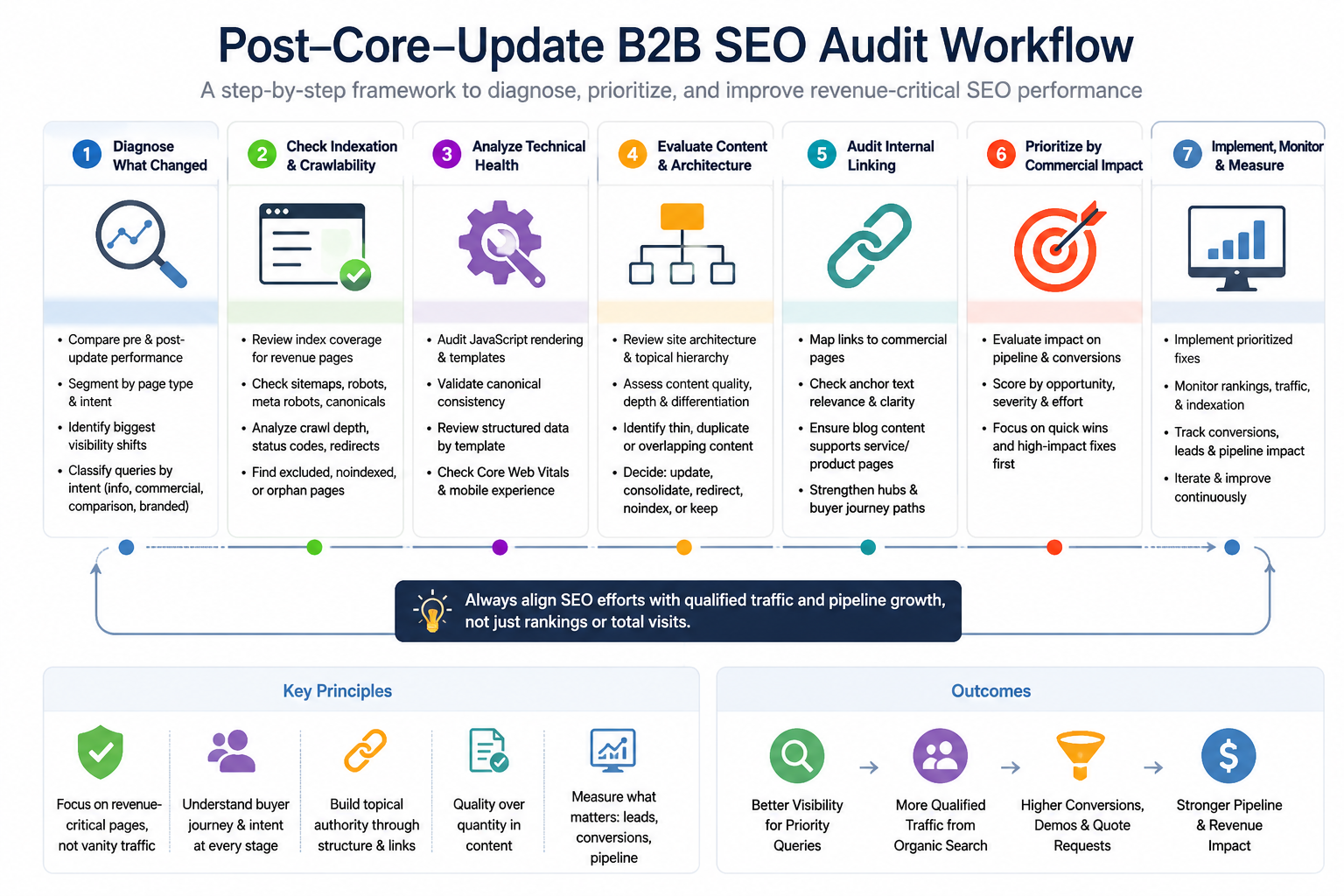
How ProsearchLab Would Approach This
ProsearchLab would approach a post-core-update SEO audit as a diagnostic process, not a panic exercise. The goal is to understand what changed, where it changed, why it may have changed, and which fixes matter commercially.
1. Diagnose the issue by page type and intent
The first step is to separate affected pages into meaningful groups:
- Services
- Solutions
- Products
- Industries
- Blog posts
- Resources
- Comparisons
- Documentation
- Conversion pages
Then affected queries should be classified by intent. This prevents the common mistake of treating a blog visibility decline and a service page decline as the same issue.
For B2B websites, this segmentation often reveals that the most visible traffic change is not always the most important commercial change.
2. Review indexation and crawlability
Next, ProsearchLab would review whether priority pages are discoverable, crawlable, indexable, and internally supported.
This includes checking:
- Robots.txt
- Meta robots tags
- XML sitemaps
- Canonical tags
- Redirect chains
- Crawl depth
- Internal links
- JavaScript-rendered content
- Status codes
- Sitemap and indexation mismatches
- Excluded or discovered-but-not-indexed URLs
The goal is to confirm whether Google can access and evaluate the pages that matter most to organic growth.
3. Map affected page types and templates
Many SEO problems are template-level problems.
If all solution pages declined, the issue may involve template duplication, weak commercial copy, poor internal links, or unclear differentiation. If older blog posts declined, the issue may involve outdated content, intent mismatch, or consolidation needs. If product pages are not indexed consistently, the issue may involve technical architecture.
Mapping affected templates helps avoid random fixes.
4. Analyze internal linking and site architecture
ProsearchLab would review how authority and relevance flow through the site.
Key questions include:
- Are important commercial pages linked from relevant educational content?
- Are service pages supported by topic clusters?
- Are product pages accessible from logical hubs?
- Are breadcrumbs reinforcing hierarchy?
- Are high-performing blog posts linking to commercial next steps?
- Are important pages buried too deep?
- Are there orphan commercial pages?
- Do internal links reflect the buyer journey?
The objective is to create a structure that helps users and search engines understand priority, relevance, and expertise.
5. Separate technical problems from content quality problems
A page may underperform because Google cannot crawl or index it properly. Another page may underperform because it is too generic, outdated, duplicative, or misaligned with search intent.
These require different solutions.
A technical SEO audit should not automatically become a content rewrite project. Likewise, a content quality problem should not be misdiagnosed as a crawl issue.
The strongest audits separate:
- Access problems
- Indexation problems
- Rendering problems
- Architecture problems
- Internal competition
- Content quality gaps
- Intent mismatch
- Conversion path weaknesses
6. Prioritize fixes based on commercial impact
Not every SEO issue deserves equal attention.
A duplicate tag page may matter less than a non-indexed product category page. A low-traffic blog post may matter less than a service page losing visibility for high-intent queries.
ProsearchLab would prioritize fixes based on:
- Commercial relevance
- Search opportunity
- Buyer intent
- Current visibility
- Conversion contribution
- Technical severity
- Implementation difficulty
- Risk of unintended consequences
This keeps the audit focused on business outcomes rather than creating a long list of low-priority SEO tasks.
7. Connect SEO work to qualified traffic and pipeline
The final step is measurement.
For B2B SEO, recovery is not simply about getting traffic back. It is about improving the site’s ability to attract, educate, and convert the right buyers.
A strong reporting model should include:
- Priority query visibility
- Commercial landing page performance
- Indexed URL health
- Organic conversion paths
- Assisted conversions
- Demo or consultation requests
- Quote requests
- CRM lead quality
- Sales feedback
- Pipeline contribution where available
This is how a post-core-update audit becomes a growth asset rather than a technical report that sits unused.